New recording view, better search and more!
A redesigned recording view, smarter recording search, new visibility settings and an updated Make integration.
✨ Say hello to the new recording view
Our redesigned recording view gives more room to the AI Assistant and AI Coach, with a mobile-optimized layout for reviewing calls on the go. Plus:
- ✨ One-click transcript copy – Copy the transcript to your clipboard with a single click.
- 📅 Associated meetings – See upcoming and past meetings with the same customer.
- ↔️ Resizable layout – Drag the vertical bar to show more transcript or more video.
Smarter search to find recordings
Search by participants (name, email, company), meeting names and CRM data from HubSpot, Pipedrive and Salesforce – including deal names, accounts and opportunities. Full-text search within transcripts is still available.
New visibility setting for colleagues
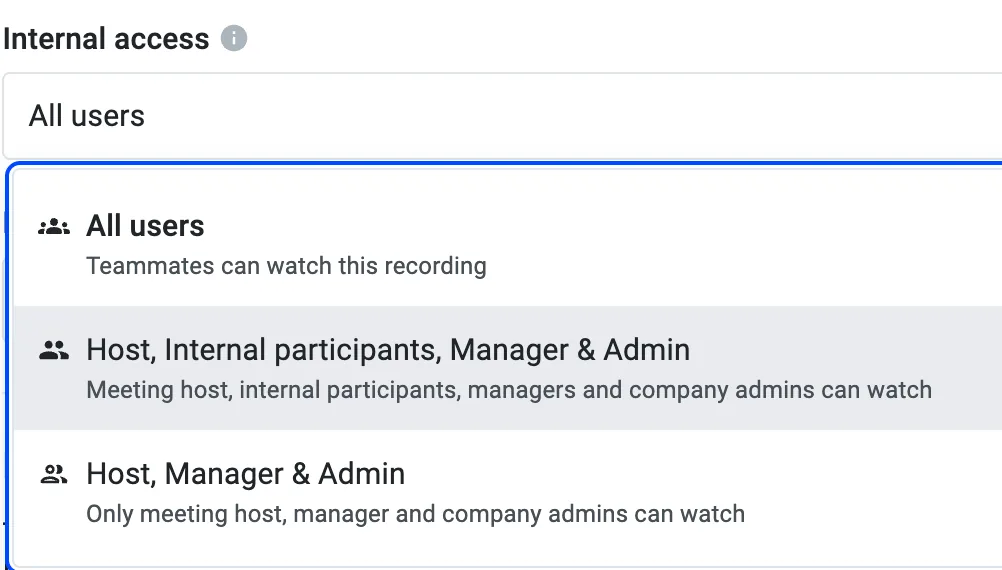
A new setting grants hosts, internal participants, managers and admins access to recordings – better collaboration while keeping privacy a top priority.
Record private meetings
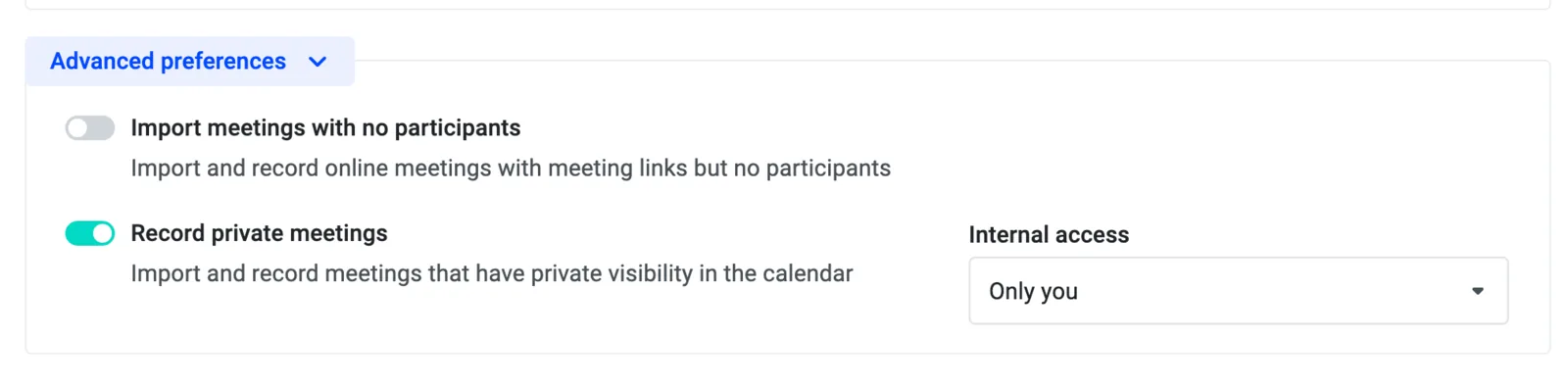
A new advanced option in your preferences lets you record private meetings. By default these recordings are visible only to you; apply it to all private meetings or adjust visibility per recording.
Updated Make integration with more webhooks
Our Make integration now supports many more webhooks out of the box – for example, to send meeting summaries to the respective Slack channels.