API Reference
Updated July 21, 2026
On this page
- API Versions
- Highlights
- API Reference
- Authentication
- Recordings
- Webhook API
- Company and User Management
- Meeting management (scheduling)
- Get all meeting types (demo templates)
- Error codes
- Customer Booking – Public Endpoints
- Terminology
- Authentication - Whitelabel
- Login Flow - Whitelabel
- Implementation
- Appendix
- demodesk-auth.js
- FAQs
Elevate the quality of your products and streamline your operational workflows by leveraging the seamless integration capabilities of the Demodesk API. With its holistic integration, Demodesk is designed to easily blend with your existing products and workflows, boosting your operational efficiency to new heights. Unleash the synergy of Demodesk and your products and redefine what is possible in operational excellence.
API Versions
Demodesk currently provides two API versions:
1. API v2 (recommended)
Our newest API version with improved support for:
- Recordings
- Transcripts
- AI summaries
- Future enhancements and endpoints
You should use API v2 whenever possible, as all new capabilities will be released there.
👉 View the API v2 documentation: https://demodesk.com/api/docs/index.html
Note: We're currently bringing more capabilities to the v2 API, and you should use it whenever possible. For some use cases, you may still need to use the v1 API. The v1 API will be discontinued in the future.
2. API v1 (legacy)
Some existing endpoints are still only available in API v1. These will gradually be migrated to v2, and v1 will be discontinued in the future.
Highlights
- Retrieval of Recordings, transcripts, summaries, and scorecards for integration in your own business intelligence system, or workflow automation.
- Our Webhooks are especially helpful for real-time notifications and workflow automations with tools like make.com or Zapier.
- Effortless Scheduling and User Creation: With the Demodesk API, automating tasks such as scheduling meetings or creating user accounts becomes a breeze. While users continue to engage with the intuitive Demodesk dashboard, the API works silently in the background, streamlining operations and enhancing user experience.
- Complete White-Label Integration:
- Your brand, front and center: With Demodesk's white-label solution, your brand stays in the spotlight. Our platform seamlessly merges with your digital ecosystem, ensuring that your customers interact solely with your branded experience.
- Your Domain, Your Meeting Space: Deploy a full white-label solution on your domain (e.g., meet.yourdomain.com) and provide a personalized, branded meeting space for your customers, further enhancing trust and brand cohesion.
- Simplified Logins: Say goodbye to the hassle of managing multiple logins. Our integration ensures a synchronized login experience with your host application, providing a streamlined access point for users.
- Your custom Dashboard: Keep the controls and build your own dashboard in your application. Our API will handle all the interactions in the background.
API Reference
Authentication
Demodesk provides user-level API Keys for authentication. Admin users can generate them in their integration settings, scroll to "Demodesk API" at the bottom.
The API key needs to be provided in the HTTP custom header api-key.
Recordings
Recordings and AI-related artifacts like transcripts, summaries or scorecards can be retrieved via our V2 API: https://demodesk.com/api/docs/index.html
Webhook API
It’s possible to listen to the following webhook events from Demodesk:
'demo.scheduled'
'demo.rescheduled'
'demo.handovered'
'demo.canceled'
'demo.started'
'demo.ended'
'recording.uploaded'
'recording.transcription_postprocessed'
Webhooks can be managed by an admin directly in Demodesk here.
Payloads
Detailed payloads can be found in our V2 API reference: https://demodesk.com/api/docs/index.html
Company and User Management
Create account
To create an account, follow these steps:
- Create account
- Provide company details
- Add users to the company
curl -X "POST" "https://demodesk.com/api/v1/auth" \
     -H 'api-key: <MASTER_3RD_PARTY_API_KEY>' \
     -H 'Content-Type: application/json' \
     -d $'{
  "confirmSuccessUrl": "confirmed",
  "password": "passwordtologintodemodeskdashboard",
  "firstName": "Stan",
  "timeZone": "Europe/Berlin",
  "email": "example@testco.com",
  "promoCodeToken": "<PROMO_CODE>",
  "lastName": "Test",
  "locale: "en"
}'
Request:
- Password (required): A password must be provided when creating the account. It must be at least 12 characters and include at least one lowercase letter, one uppercase letter, one digit, and one special character. If your users log in via SSO and won't use password login, you must still set one. In that case, use a long, random string to effectively disable password-based login.
- PromoCodeToken: pass the code you received in the partnership agreement. This will activate the floating license functionality for the account, set the appropriate trial duration and exclude this company from any Demodesk marketing campaign.
Response:
- apiKey: this API key is the master key for the company account
COMPANY_ADMIN_USER_API_KEY - status:
okorerror(seeerrors[0].detailsfor explanation)
Create company
curl -X "POST" "https://demodesk.com/api/v1/companies" \
     -H 'api-key: <COMPANY_ADMIN_USER_API_KEY>' \
     -H 'Content-Type: application/json' \
     -d $'{
  "data": {
    "attributes": {
      "name": "Test Co",
      "countryCode": "DE",
      "timeZone": "Europe/Berlin"
    }
  }
}'
Response:
- id: id of newly created company
- status:
okorerror(seeerrors[0].detailsfor explanation)
Get users of a company
curl "https://demodesk.com/api/v1/companies/<company_id>/users" \
     -H 'api-key: <COMPANY_ADMIN_USER_API_KEY>'
Add users to company
curl -X "POST" "https://demodesk.com/api/v1/users" \
     -H 'api-key: <COMPANY_ADMIN_USER_API_KEY>' \
     -H 'Content-Type: application/json' \
     -d $'{
  "data": {
    "type": "users",
    "attributes": {
      "firstName": "First",
      "email": "first.last@testco.com",
      "lastName": "Last",
      "locale": "en"
    }
  }
}'
Optional attributes: Alongside firstName , lastName, email, and locale, you can set:
available_for_scheduling(boolean, defaulttrue): whether the user is bookable via booking pages and scheduling (the "Bookable" toggle in the team-member settings). Set tofalseto make the user non-bookable.
Response:
- id: id of the newly created user
- apiKey: user's API key. Use this one to request auth tokens from the Demodesk backend to login this specific user.
- status:
okorerror(seeerrors[0].detailsfor explanation)
Update user data
curl -X "PATCH" "https://demodesk.com/api/v1/users/<user_id>" \
     -H 'api-key: <COMPANY_ADMIN_USER_API_KEY> or <USER_API_KEY>' \
     -H 'Content-Type: application/json' \
     -d $'{
  "data": {
    "id": "<user_id>",
    "type": "users",
    "attributes": {
      "firstName": "First",
      "email": "first.last@testco.com",
      "lastName": "Last"
    }
  }
}'
Optional attributes: Alongside firstName , lastName, email, and locale, you can set:
available_for_scheduling(boolean, defaulttrue): whether the user is bookable via booking pages and scheduling (the "Bookable" toggle in the team-member settings). Set tofalseto make the user non-bookable.
Response:
- status:
okorerror(seeerrors[0].detailsfor explanation)
Delete user
curl -X "DELETE" "https://demodesk.com/api/v1/users/<user_id>" \
     -H 'api-key: <COMPANY_ADMIN_USER_API_KEY> or <USER_API_KEY>'
Response:
- status:
okorerror(seeerrors[0].detailsfor explanation)
Meeting management (scheduling)
Create meetings
curl -X "POST" "https://demodesk.com/api/v1/scheduled_demos" \
     -H 'api-key: <COMPANY_ADMIN_USER_API_KEY> or <USER_API_KEY>' \
     -H 'Content-Type: application/json' \
     -d $'{
  "data": {
    "type": "demos",
    "attributes": {
      "account": "Test Account" # Meeting Name,
      "timeZone": "Europe/Berlin",
      "urls": [
        "https://google.com",
        "https://dict.cc"
      ],
      "startDate": "2020-05-25T11:30:00.000+01:00",
      "countryCode": "US",
      "duration": 1800,
      "user_id": "<user_id>",
      "setup_phone": "full",
    }
  }
}'
Response:
- id: meeting id
- status:
okorerror(seeerrors[0].detailsfor explanation)
Get meeting details
curl "https://demodesk.com/api/v1/scheduled_demos/<demo_token>"
Response:
- id: meeting id
- attributes.status: one of
scheduled,starting,started,ending,ended,canceled - status:
okorerror(seeerrors[0].detailsfor explanation)
Example response:
{
  "data": {
    "id": "<demo_id>",
    "type": "demos",
    "attributes": {
      "status": "ended",
      "duration": 3600,
      "locale": "nl",
      "countryCode": "NL",
      "timeZone": "Europe/Amsterdam",
      "account": "Example account",
      "setupPhone": "full",
      "twilioPhone": null,
      "token": "PYBGFKMZ",
      "createdAt": "2020-08-25T14:25:49.579Z",
      "updatedAt": "2020-09-02T12:56:02.451Z",
      "startDate": "2020-09-02T11:00:00.000+02:00",
      "link": "https://demodesk.com/XXXXXXXX",
      "controlUrl": "https://aws-eu-central-1.demodesk.com/api/v1/renderers/50dab44f-ecdb-4b12-8831-b0fccd608e26",
    },
    "relationships": {
      "user": {
        "data": {
          "id": "<user_id>",
          "type": "users"
        }
      },
      "participants": {
        "data": [
          {
            "id": "<participant_id>",
            "type": "participants"
          }
        ]
      },
    }
  },
  "included": [
    {
      "id": "<participant_id>",
      "type": "participants",
      "attributes": {
        "kind": "browser",
        "firstName": "Evi",
        "lastName": null,
        "fullName": "Evi",
      },
    },
  ],
  "status": "ok"
}
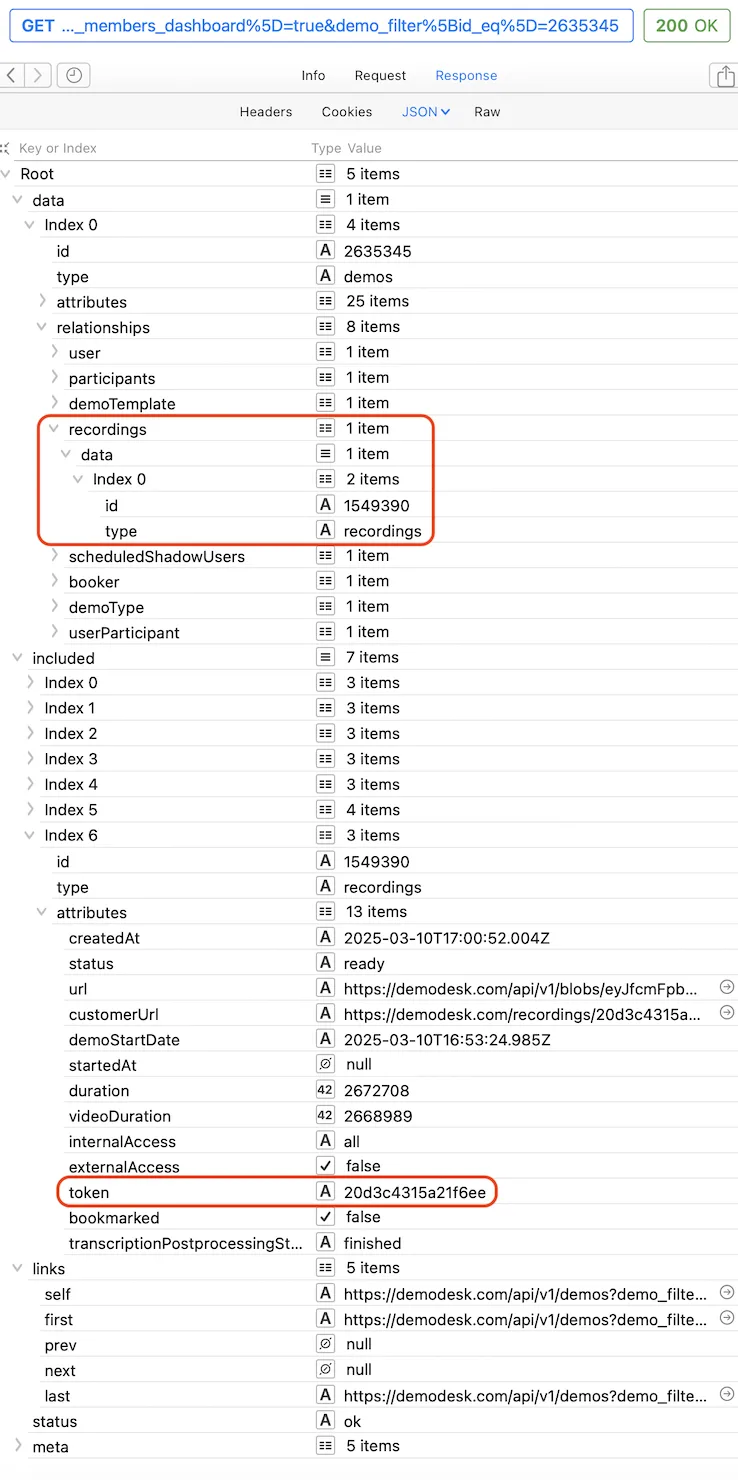
Note: Recording tokens are not the same as demo tokens. A demo token cannot be used to access recording resources.
List meetings
Note: This endpoint returns meetings visible under the “All Team Members” view. If your seat type is Coaching & AI, which does not include access to this tab, the request will return an error or an empty result.
curl -X "GET" "https://demodesk.com/api/v1/demos?page=1&filter[schedule_eq]=upcoming&filter[all_team_members_dashboard]=true" \
     -H 'api-key: <COMPANY_ADMIN_USER_API_KEY> or <USER_API_KEY>' \
     -H 'Content-Type: application/json'
Parameters (optional):
More on search matchers for filters are documented here.
- filter[schedule_eq] can be
pastorupcoming, ie. show only past or upcoming meetings - filter[all_team_members_dashboard] can be
trueorfalse, ie. whether to show meetings only for the API key user or for the full team - filter[account_i_cont] string that filters for the meeting name
- filter[start_date_gteq] meeting happened after date, e.g.
2022-10-10 - filter[start_date_lteq] meeting happened before date, e.g.
2022-10-13 - filter[group_id_eq] filters for meetings from group. Needs the group id.
- filter[recordings_present] can be
trueorfalse, ie. whether the meeting was/is going to be recorded - filter[template_name_i_cont] filters for event type name
- page is the requested page number, starting with 1. This endpoint is paginated. Use response.meta.hasNextPage to determine whether another page exists. Increment page until hasNextPage is false.
Response:
- data: array of matching meetings
- id: meeting id
- attributes.status: one of
scheduled,starting,started,ending,ended,canceled
- status:
okorerror(seeerrors[0].detailsfor explanation) - meta: pagination information
Example response:
{
  "data": [
    {
      "id": "123",
      "type": "demos",
      "attributes": {
        "status": "started",
        "duration": 1800,
        "account": "Instant meeting",
        "link": "https://demodesk.com/ABCDEFGH",
        "token": "ABCDEFGH",
        "userFirstName": "John",
        "userLastName": "Doe",
        "startDate": "2022-10-17T15:55:37.286+01:00",
      },
      "relationships": {
        "user": {"data": {"id": "9773","type": "users"}},
        "booker": {"data": {"id": "9773","type": "users"}},
        "participants": {"data": [{"id": "3427341","type": "participants"}]},
        "demoType": {"data": {"id": "5842","type": "demoTypes"}}, // playbook
        "demoTemplate": {"data": {"id": "7194","type": "demoTemplates"}}, // event type
        "recordings": {"data": []},
        "scheduledShadowUsers": {"data": []} // invited shadows
      }
    },
    {
      // next demo
    }
  ],
  "included": [
    // includes all objects that are references in "relationships"
  ],
  "status": "ok",
  "meta": {
  "currentPage": 1,
  "hasNextPage": true,
  "pageSize": 25
}
Update meeting
curl -X "PATCH" "https://demodesk.com/api/v1/scheduled_demos/<demo_id>" \
     -H 'api-key: <COMPANY_ADMIN_USER_API_KEY> or <USER_API_KEY>' \
     -H 'Content-Type: application/json' \
     -d $'{
  "data": {
    "type": "demos",
    "id": "<demo_id>",
    "attributes": {
      "account": "Updated account name"
    }
  }
}'
Response:
- id: meeting id
- status:
okorerror(seeerrors[0].detailsfor explanation)
Cancel meeting
curl -X "POST" "https://demodesk.com/api/v1/scheduled_demos/<demo_id>/cancel" \
     -H 'api-key: <COMPANY_ADMIN_USER_API_KEY> or <USER_API_KEY>'
Response:
- id: meeting id
- status:
okorerror(seeerrors[0].detailsfor explanation)
Delete meeting
curl -X "DELETE" "https://demodesk.com/api/v1/scheduled_demos/<demo_id>" \
     -H 'api-key: <COMPANY_ADMIN_USER_API_KEY> or <USER_API_KEY>'
Response:
- status:
okorerror(seeerrors[0].detailsfor explanation)
Get all meeting types (demo templates)
curl -X "GET" "https://demodesk.com/api/v1/demo_templates" \ -H "api-key: <COMPANY_ADMIN_USER_API_KEY>" or "<USER_API_KEY>" \ -H "Content-Type: application/json"
Error codes
Error responses are formatted in the following way:
{
  "errors": [
    {
      "detail": "Error 1"
    },
    {
      "detail": "Error 2"
    }
  ],
  "status": "not_found"
}
These errors are commonly used by all endpoints:
404,not_found: The requested resource was not found422,unprocessable_entity: The sent update request was invalid. Check body for details.403,forbidden:Error: 'You are not authorized to perform this action.'You don't have the required authorization to perform the requested action401,unauthorized:Error: 'The provided API key is invalid.'403,forbidden:Error: 'Illegal association id update.'400,bad_request: Malformed request. Check body for detailed error message.
Customer Booking – Public Endpoints
These two endpoints power the customer-facing booking flow and require no authentication. They are designed for automated use cases such as voice agents, chatbots, or custom booking interfaces that need to check availability and book meetings on customers' behalf.
Get Available Time Slots
GET /api/v1/customer-booking-calendar
Returns a list of days with available time slots for a given meeting type.
| Parameter | Type | Required | Description |
|---|---|---|---|
demoTemplateId | string | Yes | ID of the meeting type (your booking page) |
from | string (ISO 8601) | Yes | Start of the time range, e.g. 2026-05-06T08:00:00 |
to | string (ISO 8601) | Yes | End of the time range, e.g. 2026-05-06T18:00:00 |
timeZone | string | Yes | IANA timezone name, e.g. Europe/Berlin |
hosts | array of strings | No | Filter by specific advisors using their email addresses |
The response returns a list of days, each containing the available time slots for that day.
Book a Meeting
POST /api/v1/book/:owner/:slug
Books a meeting for a given time slot. owner and slug correspond to your booking page URL and can be found in the booking page link.
| Parameter | Type | Required | Description |
|---|---|---|---|
appointment[user_id] | integer | Yes | ID of the host/advisor |
appointment[demo_date] | string (ISO 8601) | Yes | Start time of the meeting, e.g. 2026-05-06T10:00:00 |
appointment[answers][customer_email] | string | Yes | Customer's email address |
appointment[answers][customer_first_name] | string | No | Customer's first name |
appointment[answers][customer_last_name] | string | No | Customer's last name |
appointment[answers][customer_phone] | string | No | Customer's phone number |
appointment[answers][customer_company_name] | string | No | Customer's company name |
appointment[team_members_ids] | array of integers | No | Additional host/co-host user IDs |
appointment[additional_guests] | array of objects | No | Additional attendees, each with an email field |
time_zone | string | No | IANA timezone name, e.g. Europe/Berlin |
The response returns the booking confirmation including the meeting link.
Typical integration flow (e.g. voice agent)
- Call
GET /api/v1/customer-booking-calendarwith the desired date range to retrieve available slots - Present the available slots to the customer
- Call
POST /api/v1/book/:owner/:slugwith the chosen slot and customer details - Return the meeting link and confirmation details to the customer
Terminology
- 3rd Party Backend: Your server, used for fetching authentication tokens from the Demodesk backend.
- 3rd Party Frontend: Your frontend code that implements the
DemodeskAuthlibrary. - Demodesk Backend: Demodesk’s backend, controls authentication and issues auth tokens.
- Demodesk Frontend: Demodesk’s frontend, hosts the meeting dashboard.
Authentication - Whitelabel
Authentication is managed through three types of API keys:
- MASTER_3RD_PARTY_API_KEY: Your secret partnership API key. Use this to create new accounts. Only applies to customers who whitelabel Demodesk.
- COMPANY_ADMIN_USER_API_KEY: The master API key for each company. Administer individual company accounts with this key.
- USER_API_KEY: Individual user API key. Administer individual user accounts with this key.
Login Flow - Whitelabel
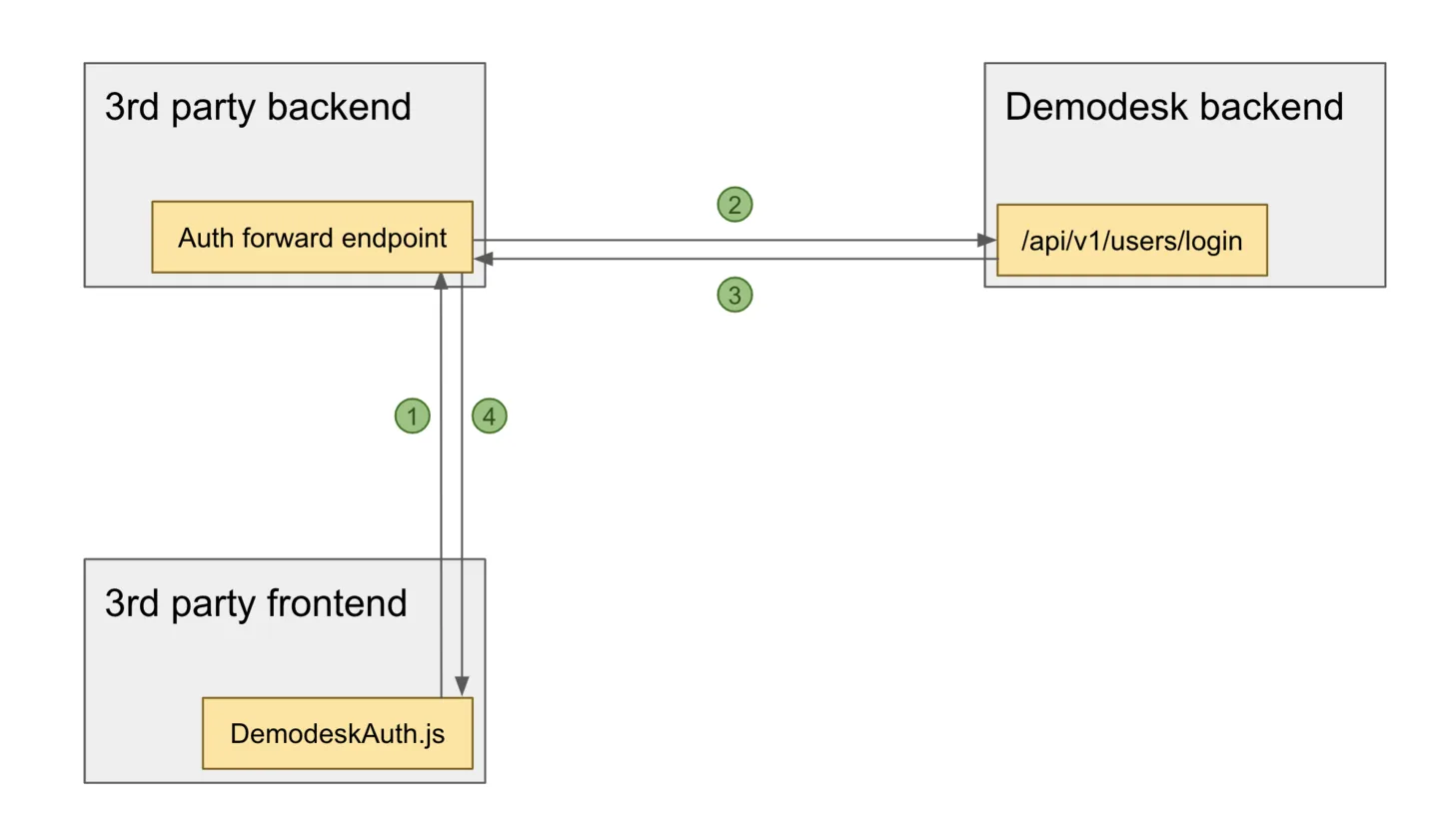
DemodeskAuthlibrary sends a request to the 3rd party backend to request an auth token.- 3rd party backend forwards the request to Demodesk backend.
- Demodesk backend responds with an auth token.
DemodeskAuthlibrary writes authorization data to browser storage.
Implementation
DemodeskAuth JS
Get the demodesk-auth.js file from the Appendix and include DemodeskAuth in the 3rd party frontend and initialize it:
var auth = new DemodeskAuth({
	foreignHost: 'yourdomain.com',
	meetingHost: 'meet.yourdomain.com',
  fetchAuthToken: function() {
		return fetch('https://yourdomain.com/api/demodesk_auth') // this is the auth forward endpoint
			.then(response => response.json())
			.then(json => json.authToken);
	},
});
Auth forward endpoint
In the 3rd party backend, create an endpoint that accepts and responds in the following format:
curl -X "POST" "https://demodesk.com/api/v1/users/login" \
     -H 'api-key: <USER_API_KEY>'
The response should have a structure like this:
{
  "status": "ok",
  "meta": {
    "access_token": "eyJhY2Nlc3NfdG9rZW4iOiIyTUx0RV9xUEdLblRkRHlVMFpBQndRIiwiY2xpZW50IjoidkFSVzRKc2VXYnM2a0VkZTV5V3RuZyIsImV4cGlyeSI6MTU5MzI1NTU0MiwidG9rZW5fdHlwZSI6IkJlYXJlciIsInVpZCI6ImFsZXhAZGVtb2Rlc2suY29tIiwicmVxdWVzdGVkX2F0IjoiMjAyMC0wNi0xM1QxMDo1OTowMloifQ=="
  }
}
Appendix
FAQs
Related articles
More in this category
Still need a hand?
Our support team answers in the app chat, or at support@demodesk.com.