How to generate an API key and manage webhooks
Updated May 12, 2026
On this page
- API keys
- How to generate your API key
- Who can generate an API key?
- When is the API key section available?
- Webhooks
- Who can manage webhooks?
- How to add a webhook endpoint
- How to edit a webhook endpoint
- How to delete a webhook endpoint
- What can be configured for a webhook?
- Webhook status
- Custom header rules
- Available webhook events
- Still need help?
Both features are available under Settings > Integrations > Connections in the Demodesk API section.
API keys
An API key lets you authenticate requests to the Demodesk API.
How to generate your API key
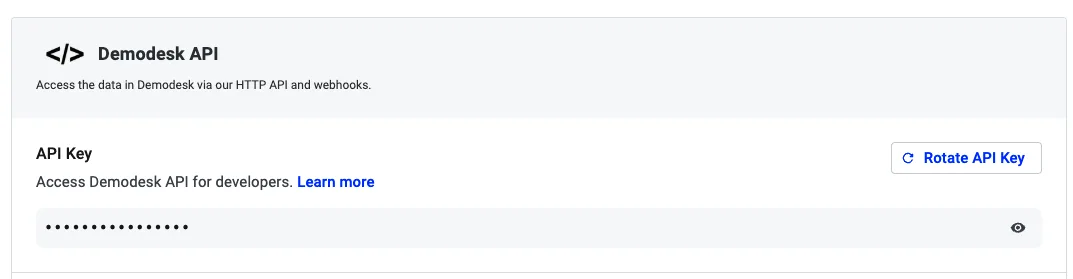
- Go to Settings
- Open Integrations
- Select Connections
- Scroll to the Demodesk API section
- Under API Key, click Generate API Key
If you already have an API key, you can click Rotate API Key to replace it with a new one.
You can also use the visibility toggle to show or hide the key on screen.
⚠️ Rotating your API key will invalidate the current key. Any integrations using the old key will stop working.
Who can generate an API key?
Any eligible logged-in user can generate and manage their own API key.
When is the API key section available?
The API key section is only available for eligible paid plans. If your company is not eligible, the API section will remain locked.
Webhooks
Webhooks let Demodesk send real-time event updates to an external endpoint.
Who can manage webhooks?
Only company admins can create, edit, or delete webhook endpoints.Managers and regular users cannot manage company webhook endpoints.
How to add a webhook endpoint
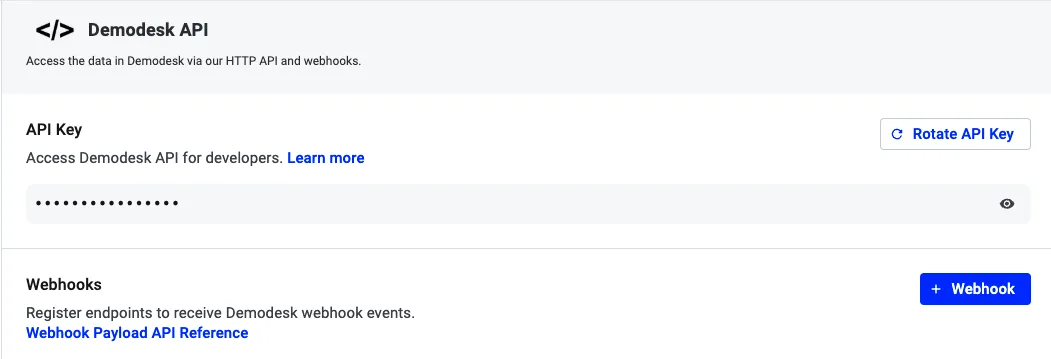
- Go to Settings
- Open Integrations
- Select Connections
- Scroll to the Demodesk API section
- In the Webhooks area, click Webhook
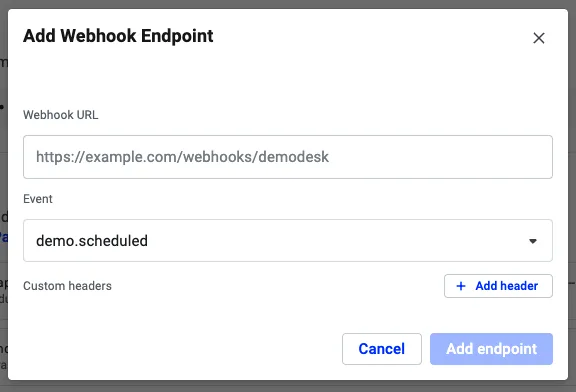
- Enter the Webhook URL
- Select the event you want to subscribe to
- Optionally add custom headers
- Click Add endpoint
How to edit a webhook endpoint
- Go to Settings > Integrations > Connections
- Open the Demodesk API section
- In the Webhooks list, find the endpoint you want to update
- Click Edit webhook
- Update the URL, event, or headers
- Click Save changes
How to delete a webhook endpoint
- Go to Settings > Integrations > Connections
- Open the Demodesk API section
- Find the webhook endpoint you want to remove
- Click the delete icon
- Confirm removal
Once removed, that endpoint will stop receiving Demodesk events.
What can be configured for a webhook?
Each webhook endpoint can include:
- A Webhook URL
- An event
- Optional custom headers
Custom headers can be useful for authentication, for example:
- Authorization: Bearer abc123
Webhook status
Webhook endpoints can appear with the following statuses:
- Healthy
- Failing
- Disabled
If a webhook keeps failing, it can become disabled after too many failed delivery attempts.
Custom header rules
When configuring webhook headers:
- Each custom header must have both a name and a value
- Header names must be unique
- Some headers are reserved and managed automatically by Demodesk
The following headers cannot be set manually:
- Content-Type
- Content-Length
- Host
Available webhook events
Demodesk currently supports webhook events for key meeting and recording actions, including:
- demo.scheduled
- demo.rescheduled
- demo.event_response_updated
- demo.handovered
- demo.canceled
- demo.started
- demo.call_note_updated
- demo.ended
- recording.uploaded
- recording.transcription_postprocessed
For payload details, refer to the Webhook Payload API Reference.
Still need help?
If you cannot access the Demodesk API section, please check:
- whether your company is on an eligible paid plan
- whether you are a company admin if you want to manage webhooks
If you still need help, contact Demodesk Support via support@demodesk.com
Related articles
More in this category
Still need a hand?
Our support team answers in the app chat, or at support@demodesk.com.