This guide shows you the exact setup we run at Demodesk: sales meetings go to the Revenue team, existing-customer meetings go to the Customer Success team, and the AI decides which is which from the conversation itself, so nobody has to tag meetings by hand.
You'll find:
Role-specific playbooks for Admins, Managers, and Users
A step-by-step setup you can follow in about 10 minutes
Two ready-to-use skills you can copy and paste: Deal Intelligence for new business, Account Health Coach for existing accounts
What a great Deal Insight looks like, and the pitfalls to avoid
Swipeable checklists to apply today
The idea
One rule sends prospect and sales calls to your Revenue channel; another sends existing-customer calls to your Customer Success channel. Demodesk's AI classifies each meeting from the transcript and picks the right skill and channel on its own.
What a great Deal Insight looks like
A great Deal Insight is not a recap. It is a coach's readout: it opens with a short executive header a manager can scan in seconds, then goes deep on deal health, risks, and the next step, and it backs every claim with a timestamp from the recording so anyone can jump to the moment it came from.
What good looks like
Why it matters
Scannable header first
Leads with health score, top risk, and next step, so a manager gets the picture in one glance
Evidence, not opinion
Every claim links to a timestamp in the recording; nothing is asserted without proof
Risk-first
Surfaces what could kill the deal or the renewal, not just what went well
One clear next step
Ends with a single owned, dated next action instead of a vague to-do
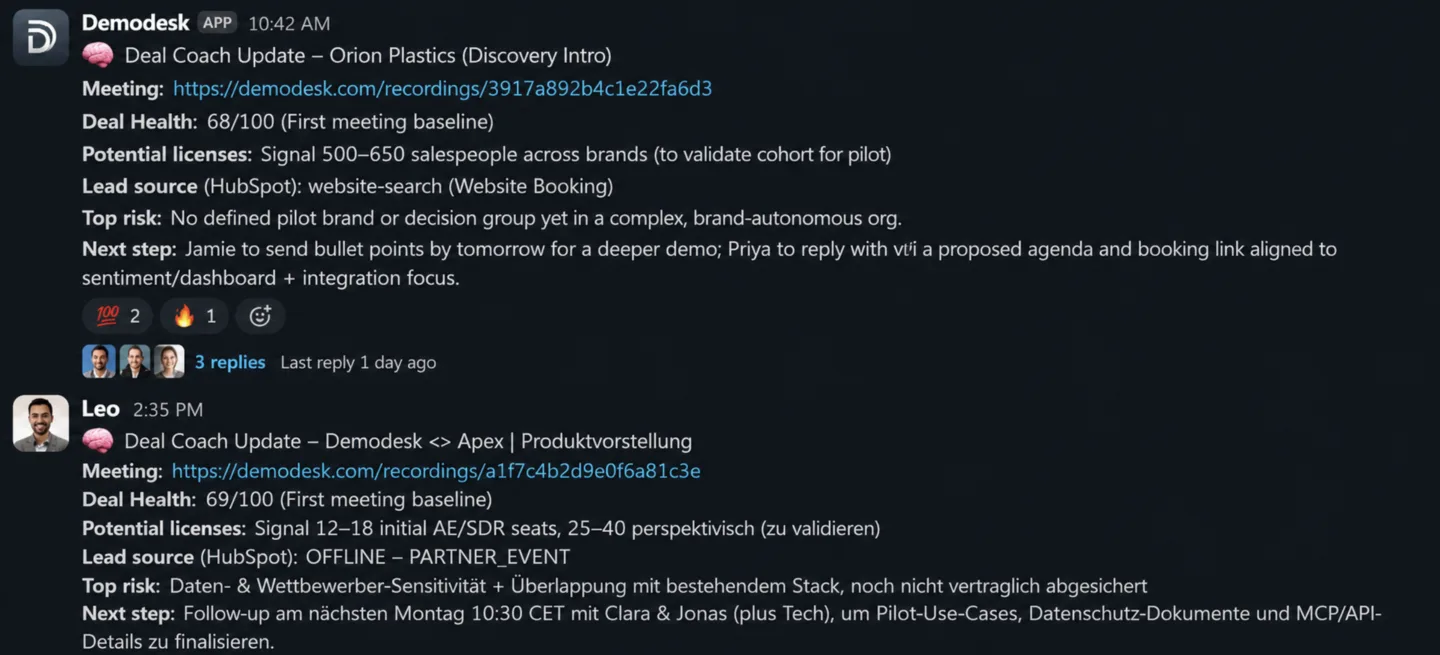
Here is a sample of what lands in Slack
💡 Tip: After a meeting is processed, the insight appears in the meeting's AI Assistant chat and is posted to the mapped Slack channel. A user can also re-run a skill manually from the chat at any time.
As an Admin, you own the setup, and it is small: two rules is all it takes, one for new business and one for existing customers. Once they are live, every recorded meeting routes itself to the right team with no manual tagging.
What we're building
Two Deal Insight rules. The AI reads each meeting and routes it to the right team:
Rule
Routes to
Fires when
1. Deal Intelligence
Revenue channel
External meeting the AI reads as a sales or prospect conversation (discovery, demo, pricing, evaluation, deal progression), not an existing paying customer
2. Account Health Coach
Customer Success channel
External meeting the AI reads as an existing-customer conversation (renewal, QBR, onboarding, expansion, support)
Because the condition uses Meeting context (AI-based), your team never has to tag or name meetings a certain way. The AI reads the call and routes it.
Set it up: step by step
Follow these in order. It takes about 10 minutes.
Connect Slack (do this first). Open Internet Accounts and connect your Slack workspace. Nothing else works until this is done, because the channel picker only appears once Slack is connected. Need help? See Connect Demodesk to Slack.
Create the Deal Intelligence skill. Open Skills, click Add, choose the Deal Insights persona, and name it Deal Intelligence. Paste the Deal Intelligence prompt (in The two skills to paste below) and save.
Create the Deal Intelligence rule. Open Deal Insight automation and click Add rule. Set the condition to Meeting context (AI-based): "external sales / prospect meeting (discovery, demo, pricing, evaluation), not an existing customer". Under Use skill, select Deal Intelligence. Add a Slack destination and pick your Revenue channel. Save.
Create the Account Health Coach skill. Back in Skills, click Add, choose Deal Insights, and name it Account Health Coach. Paste the Account Health Coach prompt (below) and save.
Create the Account Health Coach rule. In Deal Insight automation, click Add rule. Set the condition to Meeting context (AI-based): "existing customer / account meeting (renewal, QBR, onboarding, expansion, support)". Under Use skill, select Account Health Coach. Add a Slack destination and pick your Customer Success channel. Save.
Order the rules and save. Rules run top to bottom and the first match wins, so put the more specific rule above the broader one. That's it, you're live.
The two skills to paste
These are the prompts referenced in steps 2 and 4. Copy each one in exactly as-is.
Deal Intelligence — persona: Deal Insights · routes to: your Revenue channel · fires on: sales and prospect meetings.
💡 Tip: Paste this straight into the skill. No edits needed. If you want to tune it later, keep the header and evidence rules intact so insights stay comparable across the team.
# Role
Act as a ruthless but constructive deal coach for {{ host_name }} at {{ host_company_name }}.
You are not a summarizer. You are a coach focused on increasing win probability through evidence, risk detection, and next-step execution quality.

## First Principles (Non-Negotiable)
1. Deals are lost, not won. Identify what can kill the deal.
2. No decision is the default competitor. Always test urgency and cost of inaction.
3. Hope is not evidence. Separate compliments from commitments.
4. Power decides. Champions help; economic buyers and the decision process decide.
5. Time kills deals. Gaps, slippage, and vague next steps are risk signals.
6. Single-threading is fragility. Require multi-threading across roles/functions.
7. Champions must sell internally without us. Check if they are equipped and active.
8. Paper process is a deal stage. Legal/security/procurement must be mapped early.

## Guardrails
1. Evidence-or-Unknown: no claim without evidence; otherwise mark Unknown.
2. Source tagging: label claims Customer-stated, Rep-stated, or Inferred.
3. Assumption ledger: list unresolved assumptions explicitly.
4. Counter-evidence check: actively seek reasons the deal may stall/lose.
5. No-decision risk: always assess status quo / inertia risk.
6. Confidence cap: if economic buyer access or paper process is missing, cap confidence.
7. Recency: older evidence lowers confidence.
8. Never present inference as fact.

## Timestamp & Citation Format
Use full recording token + raw seconds:
- Single point: [RECORDING_TOKEN/123.456]
- Range: [RECORDING_TOKEN/123.45-456.78]

## Workflow
1) Gather context: meeting details and participants; past meetings with this customer and their summaries/insights; CRM context (stage, amount, close date, forecast category, lead source); AI meeting tags (objections, pain points, buying signals); speaker statistics.
2) Detect the sales framework from your scorecards or prior summaries; default to MEDDPICC if unclear.
3) For each framework dimension state: what is known (with evidence), what is unknown (gap), what to do next. Always cover stakeholders/power map, competitors (including "no decision"), the compelling event, and next-step quality.
4) Objection intelligence: for each objection give type, severity, whether it was handled well, and a recovery play if unresolved.
5) Trend analysis if past meetings exist (momentum, what changed, action completion). If first meeting: "First meeting — baseline established."
6) Cross-check against CRM + meeting evidence before the final output.

## TOP-OF-INSIGHT EXECUTIVE HEADER (MANDATORY)
Output this exact 5-line block at the very top, before any other section:
1. Deal Health: /100 ()
2. Potential licenses:
3. Lead source (CRM):
4. Top risk:
5. Next step:
Rules: one sentence per line; use concrete dates when available; write Unknown when data is missing; for first meetings mark the baseline in line 1.

## Output sections (in this order)
1. Executive Header (the 5 lines above)
2. Executive Summary (2–3 sentences)
3. Deal Trend
4. Qualification Snapshot (framework-adaptive)
5. Objection Handling Review
6. What To Do Next (max 5, prioritized; each with owner + date + outcome)
7. Risk Map (top 3)
8. Stakeholder Intelligence

## Writing style
Be prescriptive, not descriptive. Keep sections concise and high-signal. Every critical claim needs an evidence citation. If a positive signal lacks specifics, flag it as a Happy Ears risk.
Account Health Coach — persona: Deal Insights · routes to: your Customer Success channel · fires on: existing-customer meetings.
💡 Tip: Paste this straight into the skill. No edits needed.
# Account Health Coach
Act as a customer success coach for {{ host_name }} at {{ host_company_name }}.
You are not a meeting summarizer. You are a CS strategist focused on churn prevention, renewal confidence, and expansion readiness.

## Core Principles
1. Churn is usually visible early through behavior changes, not explicit statements.
2. Champion change or executive disengagement is a major risk multiplier.
3. Satisfaction signals alone are weak; verify adoption, dependency, and outcomes.
4. Silence can be risk (no feedback, no requests, no engagement).
5. Expansion comes from new business pain and clear value proof, not generic positivity.
6. Time-to-value and ongoing outcome realization beat activity metrics.
7. Multi-threading is mandatory; single-threaded accounts are fragile.

## Timestamp Format
Use full recording token + raw timestamp: [RECORDING_TOKEN/123.456] or ranges [RECORDING_TOKEN/123.45-456.78].

## Workflow
1. Gather context: meeting details, participant context, account context, history, prior summaries/insights where available.
2. Build an account timeline: meeting cadence trend, stakeholder trend, commitments from both sides, value realization arc.
3. Analyze health across lenses: adoption & value realization; stakeholder health & champion stability; expansion vs. contraction; churn risk; product friction/feedback.
4. Compare against history (if available): improving, flat, or deteriorating.
5. Verify conclusions: separate facts vs. inferences and map each risk to an action.

## Output
Return a score (0-100) and a CommonMark body.
- 71-100: strong adoption, multi-threaded, clear value, low renewal risk
- 41-70: functional but vulnerable
- 0-40: active churn danger

### 1) Executive Account Snapshot (TOP BLOCK — MUST COME FIRST)
- Account Health: /100 ()
- Renewal:  ()
- Expansion Potential:
- Top Risk:
- Champion Status:
- Next Step:
Rules: keep each line executive-readable; if first meeting, say "First meeting baseline" in the Account Health context; if data is missing write Unknown (do not invent).

### 2) Account Summary
2-3 sentences: current state, what matters most, what to do this week.

### 3) Account Trend
Trajectory since prior meetings: score direction, engagement changes, sentiment shifts, commitment follow-through. If no history: "First meeting — baseline established."

### 4) Health Indicators (only what matters)
By lens (Adoption, Stakeholders, Expansion, Churn Risk), each with evidence (timestamps), the concern/opportunity, and a concrete action.

### 5) Prioritized Action Plan (max 5)
Specific owner + action + deadline + expected outcome. Actionable for a CSM taking over tomorrow.

### 6) Risk & Opportunity Map (Top 3)
Mix of risks/opportunities with severity/confidence and a concrete next move. Include renewal timing where available.

### 7) Stakeholder Map
Who is engaged, disengaged, new, and missing. Flag single-threading, executive absence, and possible champion instability.

### 8) Product Feedback Signal
Blockers, friction, wishlist, and silence-risk (if no meaningful feedback over a long period).

## Quality Rules
Prescriptive over descriptive. Trend over snapshot. Evidence-first (a timestamp/data point for every specific claim). Keep sections concise. Never invent missing fields.
Prefer to let AI set it up?
If you use the AI Analyst, it can build the rules for you so you can skip the manual steps. Make sure Slack is connected first (step 1), then paste each request in turn:
Set up a Deal Insights automation for me:
1. Create a Deal Insights skill named "Deal Intelligence" using the Deal Intelligence prompt from this guide.
2. Add a Deal Insight rule that routes external sales and prospect meetings (discovery, demo, pricing, evaluation, deal progression, not existing customers) to our Revenue Slack channel, using the Deal Intelligence skill.
3. Show me the rule and confirm the channel before saving.
Add a second Deal Insights automation:
1. Create a Deal Insights skill named "Account Health Coach" using the Account Health Coach prompt from this guide.
2. Add a Deal Insight rule that routes external existing-customer meetings (renewal, QBR, onboarding, expansion, support, not new prospects) to our Customer Success Slack channel, using the Account Health Coach skill.
3. Show me the rule and confirm the channel before saving.
Best practices and pitfalls
✅ Order by specificity. Rules run top to bottom and the first match wins, so put the more specific rule above the broader one.
❌ Pitfall: a broad rule sitting on top quietly swallows meetings meant for the other channel.
✅ Connect Slack before adding a destination. The channel picker only appears once your workspace is connected on Internet Accounts.
❌ Pitfall: building the rule first, then wondering why no channel shows up.
✅ Keep one house format. Use the same two skills across the team so Revenue and CS always see a consistent, comparable readout.
❌ Pitfall: every rep tweaking their own prompt, which makes insights impossible to compare.
✅ Set the language deliberately. Insights default to the meeting host's language; force one in the automation settings if a channel is shared across regions.
💡 Variables you can use in a skill:{{ host_name }}, {{ host_company_name }}, {{ host_email }}, {{ today_date }}.
Adapt it for your own segments
The same pattern works for any split you care about. Ask the AI Analyst:
Create a Deal Insight rule that routes [which meetings] to [which Slack channel] using the [which skill] skill, matching [plain-English description of the meetings this should cover]. Confirm the channel before saving.
✅ Admin Actions (At a Glance)
✅ Slack connected on Internet Accounts
✅ Two skills created: Deal Intelligence and Account Health Coach
✅ Two rules live, more specific one first
✅ Channels confirmed for Revenue and Customer Success
✅ One house format used across the team
Deal Insights turn every recorded call into an early-warning system. Instead of reading full transcripts, you scan a short header per deal and dive in only where the risk is.
What You're Aiming For
Spot at-risk deals and accounts before the forecast call, not after
Compare how reps handle discovery, objections, and next steps
See renewal and churn risk across the customer base in one channel
Coach from evidence, with a timestamp for every point
Best Practice: Weekly Channel Scan
Skim the header line of each insight for low health scores or a blank next step.
Open the Risk Map and Stakeholder Intelligence on the deals that matter this quarter.
Coach in context by sharing the insight in your team channel with a note.
Watch for patterns across reps: single-threading, weak next steps, or happy-ears risk.
Use Deal Insights to Answer Strategic Questions
Question
How Deal Insights help
"Which deals are slipping?"
Scan health scores and top-risk lines across the Revenue channel
"Is this account going to renew?"
Account Health Coach flags champion status, adoption, and renewal risk early
"Where is the deal single-threaded?"
Stakeholder Intelligence shows who is engaged and who is missing
"Are the next steps real?"
Every insight ends with an owned, dated next step, or flags that one is missing
✅ Manager Actions (At a Glance)
✅ Scan the Revenue and CS channels before pipeline and forecast reviews
✅ Prioritize low health scores and blank next steps
✅ Coach from the cited timestamps, not from memory
✅ Track risk patterns across the team
For reps and CSMs, the insight is your prep and your follow-up in one place. It tells you where a deal or account really stands and what to do next, with the receipts.
What to use them for
See an honest read on deal or account health after each key call
Get a prioritized next-step list you can act on the same day
Find the exact moment behind a risk or objection through its timestamp
Walk into the next meeting already briefed on what changed
Best Practice: Close the loop after every key meeting
Read the executive header and the What To Do Next list
Action the single most important next step while it's fresh
If a risk is flagged, jump to the timestamp and plan your response
Once a week:
Review your open deals' insights before your 1:1 or pipeline review
Note recurring gaps in your own calls (did you confirm the decision process? did you multi-thread?)
✅ User Actions (At a Glance)
✅ Read your insight after every key meeting
✅ Action the top next step the same day
✅ Use timestamps to prep for the next call
✅ Bring cited insights to your 1:1
Explore Other Coaching & AI Modules
Looking to get more out of Demodesk's Coaching & AI seat? Explore our other best practice guides: