Deal Insights
Updated April 13, 2026
On this page
Deal Insights
Deal Insights gives your team a clear, evidence-based view of deal health by analyzing real customer conversations. Instead of relying on CRM stages or gut feel alone, Deal Insights shows what is actually happening in your opportunities based on what was said during meetings.
Overview
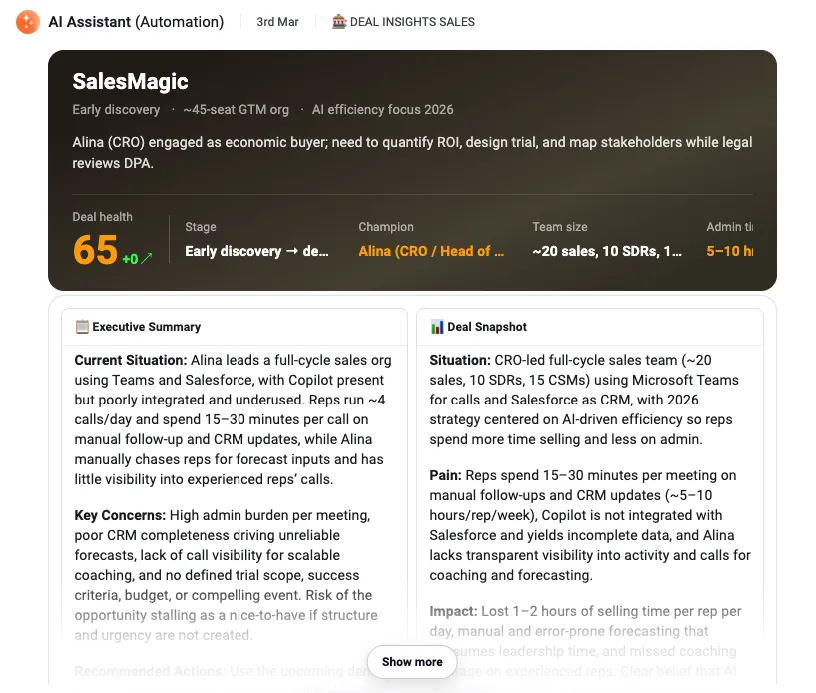
Deal Insights analyzes meetings and generates a structured summary of deal health, including:
- Deal health score
- Positive buying signals
- Risks and blockers
- Customer concerns
- Suggested next steps
This helps teams quickly understand what is moving a deal forward, what may be putting it at risk, and where action is needed next.
How Deal Insights Work
Deal Insights combine three core components:
1. Conversation Evidence
Insights are based on what was said in meetings, including objections, commitments, open questions, and unresolved topics.
2. Deal Insight Logic (Skills and Rules)
You define which Deal Insight skill runs using AI Automation rules.
3. Meeting and Business Context
Rules can include metadata and AI-evaluated context, such as meeting type, audience, host details, or custom meeting context instructions.
Why This Matters
A positive meeting does not always mean real deal progress. Deal Insights add an objective layer to help teams understand what actually moved forward and what still needs attention.
| Question | What Deal Insights Evaluate |
|---|---|
| Is there real urgency? | Explicit timing and priority signals |
| Are stakeholders involved? | Presence of decision-makers |
| Is there a next step? | Clarity of commitments |
| Are objections resolved? | Open versus handled concerns |
| Does stage match reality? | Conversation evidence versus CRM alignment |
This leads to more accurate forecasting, better pipeline visibility, and more effective coaching.
Common Use Cases
- Deal health checks after each customer meeting
- Early identification of risks and blockers
- More consistent, evidence-based rep coaching
- Qualification analysis using frameworks like MEDDICC
- Forecast validation in later stages
- Tracking progress against close plans or success plans
How to Enable Deal Insights
-
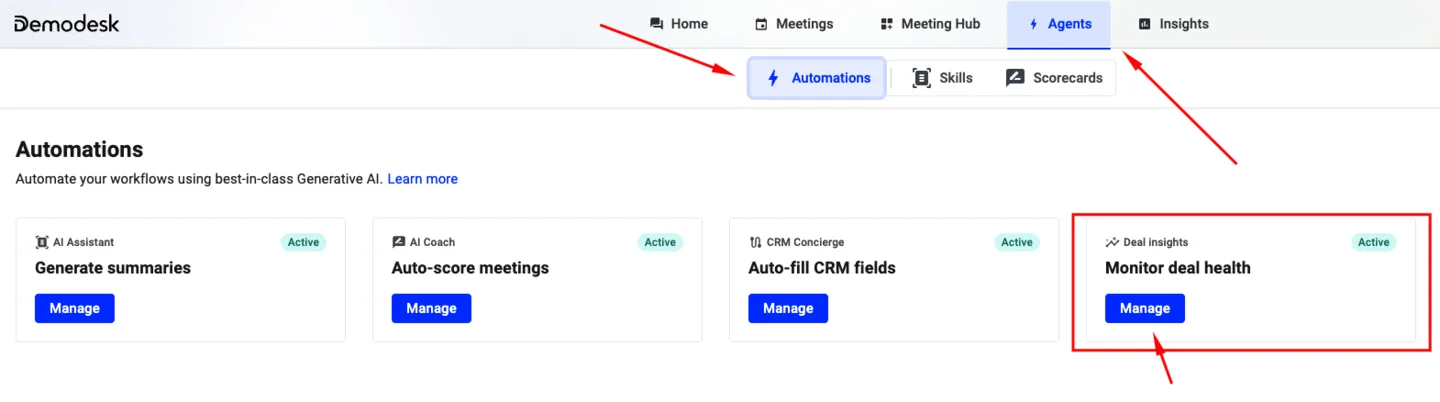
Go to Automations in Demodesk.
-
Open Monitor deal health under Deal insights.
-
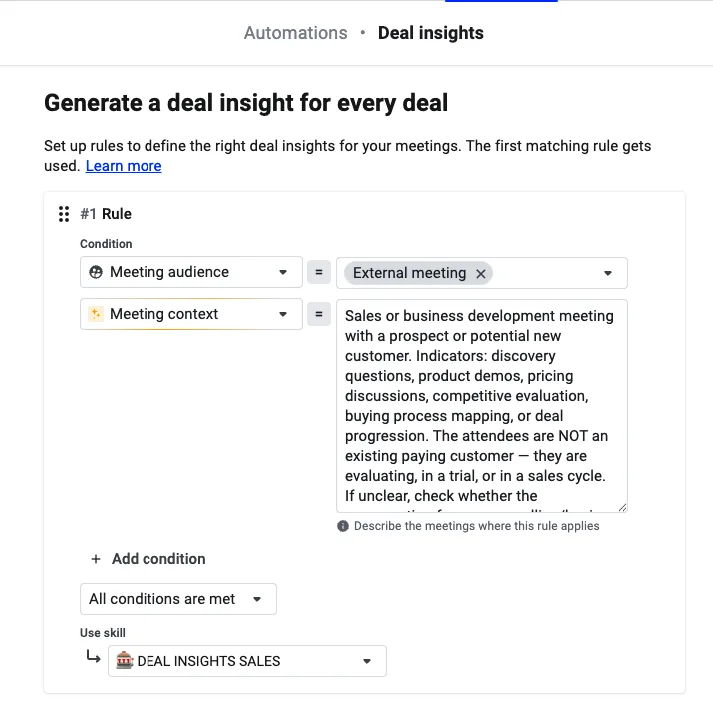
Click Add rule.
-
Optionally define conditions such as:
-
Meeting category, type, or audience
-
Host details, such as email or role
-
User group
-
Meeting name
-
Meeting context (AI-based)
-
-
Select a Deal Insight skill under Use skill.
-
Reorder rules if needed. The top rule has the highest priority.
-
Click Save and close.
Viewing Deal Insights
After a meeting is processed, Deal Insights appear automatically in the meeting’s AI Assistant chat if a rule was matched.
Users can also trigger deeper analysis manually in chat using Deal Insight skills.
Related articles
More in this category
Still need a hand?
Our support team answers in the app chat, or at support@demodesk.com.