How to integrate Salesforce with Demodesk
Updated October 10, 2025
On this page
If you connect your Salesforce Account with Demodesk you ensure your customer interactions are logged, meeting notes are available and visible to you and your team, and you generally increase the data quality within your organization.
Capabilities of the Demodesk Salesforce Integration:
- Schedule Demodesk Meetings via Salesforce.
- Meeting, Contacts, Leads, Opportunities, and Accounts can be created automatically.
- Call notes, the attendee list, the meeting status (held/no show), and the more relevant meeting data can be synced to Salesforce via System Tokens.
- Tokens can be connected with Salesforce fields. Thus you can automatically sync the answers to booking questions to properties on all standard objects (Opportunity, Account, Contact, Lead, Event) in Salesforce. Moreover, you to check and update Salesforce fields directly during your meeting.
Things you need to consider:
- Make sure you use the same email address for Salesforce, Demodesk, and your Google or Outlook account.
- Salesforce integration requires a Salesforce Enterprise Lightning account or higher.
- Make sure every user has permission to update/ create the Salesforce fields you connect the Demodesk Tokens with.
Note: Demodesk needs to be connected as an App in Salesforce for users to successfully connect their accounts. This ensures a stable and secure integration across all users.
You can find the steps to set this up here: Salesforce Help – Install a Connected App
❗Salesforce Sandbox: To connect to Salesforce Sandbox, contact Demodesk support through the chat in the bottom left corner or contact support@demodesk.com. Please note that connecting to the Sandbox is only possible after contacting the Support team - who will enable this feature for you. After activation, simply navigate to the Integrations page on Demodesk, click on "Connect Sandbox," and proceed to configure a "custom domain" according to your preferences to complete the setup.
How it works:
- Every Demodesk user needs to connect his Salesforce account separately.
- You can integrate your Salesforce account in the settings section. Just click on connect and you will be guided through the process of signing in.
- Set up your integration settings based on your needs. You can decide whether Demodesk is allowed to create Leads, Contacts or Events and where they should be related to.
- Create custom tokens to connect them to booking questions and use them in your playbooks.
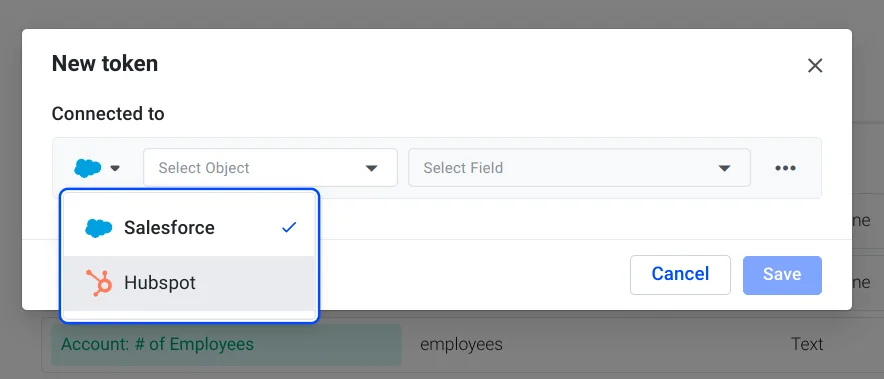
FYI: If you have more than one CRM connected, you will now be able to choose which CRM you want to connect to a token.
Please note, that this only applies, when you have multiple CRM's (Hubspot/ Pipedrive/ Salesforce) connected.
FAQs & Troubleshooting
Read our FAQs and Troubleshooting tips here
Related articles
More in this category
Still need a hand?
Our support team answers in the app chat, or at support@demodesk.com.