Audio & video troubleshooting
Updated October 17, 2024
On this page
If you are receiving error messages, that your camera or audio is blocked by your system, please refer to this article. The following article focusses on joining via a computer. For joining via mobile phone, please check out this article instead.
⚡ Pro Tip: Run a quick diagnostic here to identify what could cause the issue or simply to ensure that everything is running smoothly before your meeting.
Do you need this article in another language?
Step 1: Connect Audio and Video
- Once the meeting is opened, you will be asked to connect the mic and the camera. Simply enable them on your browser.
- Test your speaker by clicking on Test Speaker, and test your mic by saying something and see if the mic volume indicator is moving.
Step 2: Check your hardware and settings
-
Make sure they are plugged into your computer and turned on. If you connect any of your hardware using USB, check if you need to install software from the device manufacturer.
-
Go to Audio & Video Settings in the bottom right corner and check your speakers and microphone. Make sure the correct device is selected for each setting (change it using the Down arrow)
🎥 Camera: If your camera is working, you’ll see your video.🎤 Microphone: To test your microphone, speak out and see if the volume indicator is moving.
🎧 Speakers: To test your speakers, click Test.
Step 3: Check if everyone is connected and not muted
- Open the Participants Overview in the bottom left corner and check whether the participants have connected their audio and the mic and make sure they are not muted.
- When everything is correct, you should see a green mic🎤. If the mic is not showing, that means that your participant is still onboarding the meeting.
Step 4: Check participants' hardware and settings
- Tell your participants to check their settings. Settings can be accessed by either clicking directly on the small arrows on the camera and microphone buttons or by clicking on more in the bottom right corner and then on audio video settings.
- Tell them to make sure they are plugged into your computer and turned on. If you connect any of your hardware using USB, check if you need to install software from the device manufacturer.
Step 5: Reload the page or Dial-In
- If it's still not working, please reload the page and tell your participants to reload as well.
- If all steps are not working, please dial-in with your phone.
Note: when dialing-in via phone, and you hear an echo or yourself twice, or even others twice, then make sure to:
- Mute the mic of whom dialed-in. You can also actively mute your dialed-in participants from the participants' list.
- Not to be in the same room as your participants (e.g., your teammate).
Step 6: Next steps
If you have contact with participants that tend to face challenges when joining meetings then let our support team know and we will enable the dial-out functionality for you. This way you can call your participants with Demodesk directly on their phone and therefore get them into your meeting.
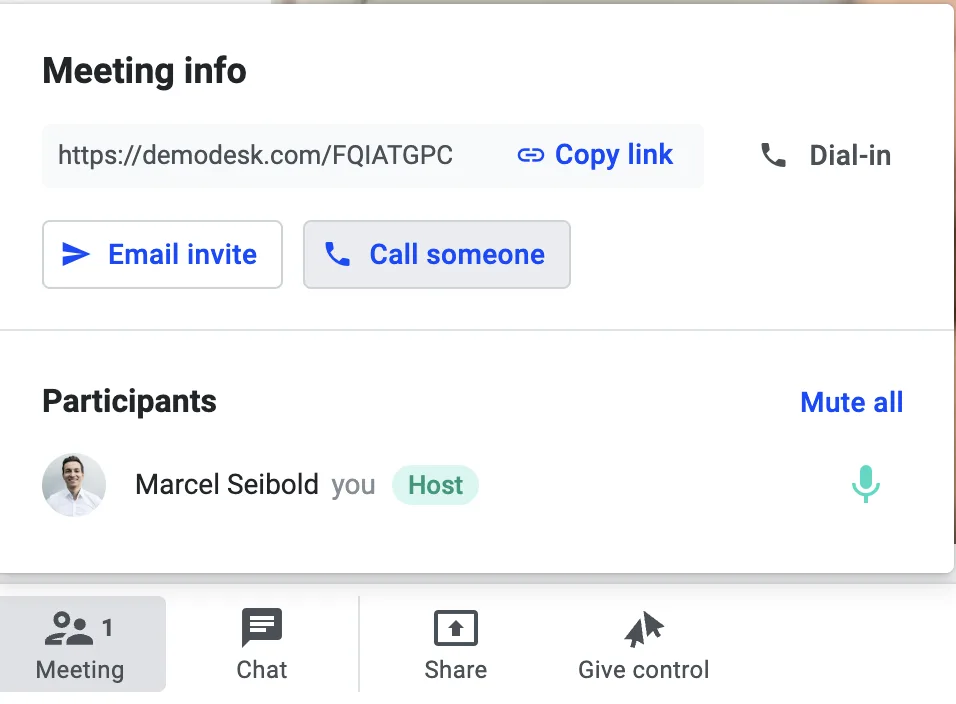
- Click on Meeting and then on Call someone
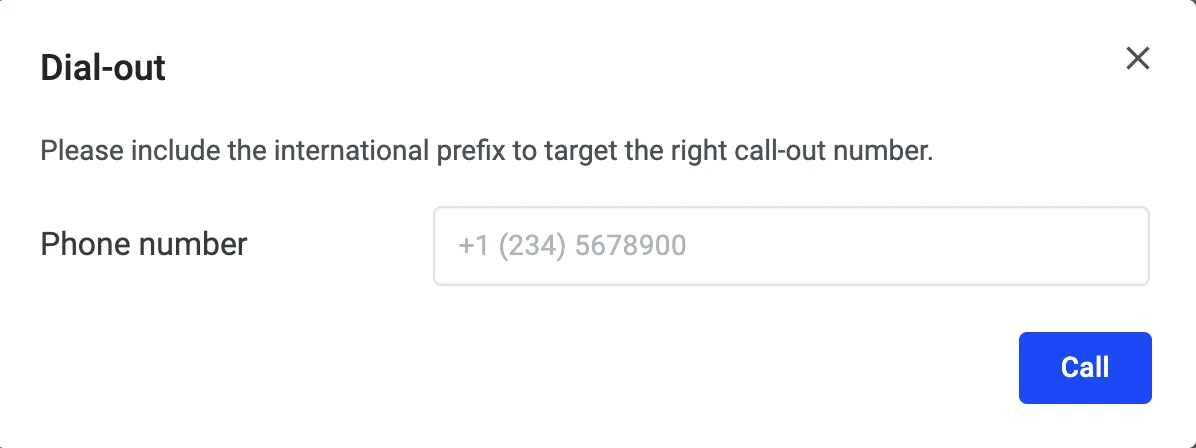
- Insert the phone number with the country code
- On success, you will see that the phone number joined as a participant into the meeting
A final note: Demodesk works with almost every browser currently in use. However, if you wish to set up a webcam connection or share the customers' local screen, not all browsers are equally compatible.
To get the most out of all Demodesk features, we encourage using Chrome or Firefox in their respective latest versions. Please make sure you have enabled Browser Permissions in order to access your microphone and Webcam.
Related articles
More in this category
Still need a hand?
Our support team answers in the app chat, or at support@demodesk.com.